

Scammers Impersonated our Company
Here's What They Sent
By David Luft | CEO, LDD Consulting | MCSE, MCT, MBA | Published November 12, 2026 | 7 min read
THE SHORT ANSWER
In September, scammers sent 15 to 20 of our own website clients a series of emails pretending to be us. They copied our LDD Web Design logo, wrote in a friendly professional tone, and asked for $600 for “required” website updates. The emails came from a Gmail address, not from our domain. If a vendor you work with ever emails you about an urgent problem and a payment, verify it by calling a number you already have before you reply.
What Happened
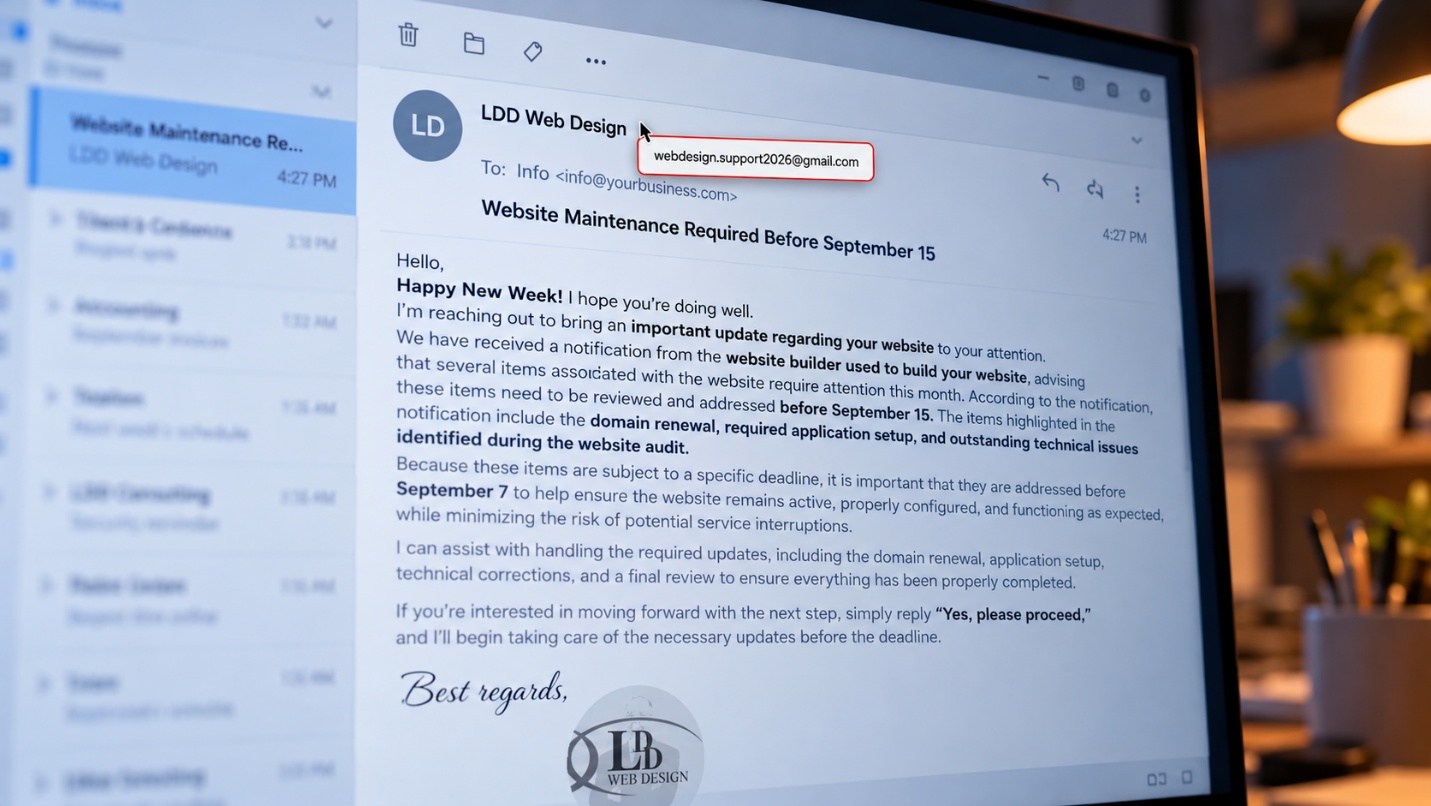
On September 8, 2026, somewhere between 15 and 20 of our web design clients received an email with the subject line “Website Maintenance Required Before September 15.” It was addressed to their general info@ mailboxes and signed with our LDD Web Design logo. It said the platform their website was built on had flagged several issues, including a domain renewal, an application setup, and problems found in a “website audit,” all due by a deadline.
The email didn’t ask for money. It didn’t include a link or an attachment. It asked for one thing: reply “Yes, please proceed.”
At least one client did. Within a short time, a second email arrived, now addressed to that person by first name, thanking them for confirming. It explained that “essential tools, plugins, and application components” had to be purchased first, at a total cost of $600, and promised to send “the next steps” once they were ready.
None of it came from us. The emails were sent from a Gmail account using our name and logo. Our clients did the right thing: they brought the emails to us and asked whether they were real. No one paid.
Pro tip: The fastest way to stop an impersonation scam is a client who feels comfortable asking, “Did you really send this?” Tell your customers they can always check with you.
How the Scam Was Built
Looking at the emails side by side, almost every line had a purpose. Here’s what the scammers wrote and what each part was designed to do:
| The scam email said | What it was really doing |
|---|---|
| “Happy New Week! I hope you’re doing well.” | A friendly, generic opener used in high-volume scam campaigns |
| “A notification from the website builder used to build your website” | Staying vague so it fits any client, whatever their site runs on |
| “Domain renewal, required application setup, and outstanding technical issues” | Naming things that sound real and urgent but that a client can’t easily check |
| “Before September 15” and, two sentences later, “before September 7” | Creating a deadline, and getting it wrong: September 7 had already passed when the email arrived on September 8 |
| “Simply reply ‘Yes, please proceed'” | Getting a small yes first, with no link or attachment for a filter to catch |
| “$600 for required tools and plugins” | Asking for money only after the client had already agreed |
| “I will provide the next steps” | Holding back the payment method until the client was committed |
It’s worth noticing what the emails did well. They used our real logo. They referred to real things website owners deal with, like domain renewals. The tone was polite and professional, not pushy. This was not an obvious scam, and that is why we’re sharing it.
Pro tip: The polished parts of a scam are what it wants you to look at. The details that don’t add up, like two different deadlines, are what it hopes you’ll miss.
Why It Came as a Series of Emails
What stood out most to our team was that the scammers didn’t ask for money in the first email. They asked for a simple yes.
That’s deliberate. A first message with no link, no attachment, and no payment request looks harmless to a spam filter and to a busy reader. Once someone replies, three things change. The scammer knows the mailbox is monitored by a real person. They learn the person’s name from the reply, which is why the second email opened with “Hi” and a first name. And the client has already agreed to move forward, which makes the next request feel like a natural next step instead of a cold ask.
Even the payment step was held back. The $600 email didn’t include a way to pay, just a promise of “next steps.” By the time a client got payment instructions, they would have said yes twice.
Pro tip: Treat a reply as a commitment. Before you answer any unexpected request, even with a simple “yes,” confirm it’s real.
Why Our Email Security Couldn’t Stop It
Last week we wrote about SPF, DKIM, and DMARC, the settings that stop scammers from sending email that appears to come from your exact domain. Our domain has all three in place. They did their job: the scammers couldn’t send as lddconsulting.com.
So they didn’t try. They used a free Gmail account instead, put our company name in the display name, and pasted our logo into the signature. Nothing about that breaks a technical rule. It just borrows our name.
On a phone, many email apps show only the display name, not the address behind it. A message from “LDD Web Design” looks like it’s from us unless you tap to see the full address.
Scammers also don’t need to hack anything to know who our clients are. We don’t know exactly how they found ours. But many websites include a small “Website by” credit in the footer, and a scammer can find dozens of them with a simple search.
Pro tip: Email security protects your domain. It can’t protect your name. That part depends on your customers knowing how you normally communicate.
The Red Flags, in Hindsight
Every one of these was visible in the emails:
- The sender was a Gmail address. A real vendor writes from their company domain, not a free account.
- The deadlines didn’t match. The email said September 15 in one paragraph and September 7 in the next, and it arrived on September 8, after one of its own deadlines had already passed.
- The details were vague. “The website builder used to build your website” is something you write when you don’t know which one it is.
- The greeting was generic. The first email opened with “Hello” and “Happy New Week!” Your actual vendor knows your name.
- The money came after the yes. A legitimate vendor tells you the cost before asking you to approve the work.
- The formatting was sloppy. Missing spaces between words (“high prioritybecause”) are easy to miss, but they rarely appear in a real vendor’s email.
- It didn’t match how we work. Our clients’ maintenance and renewals are already part of their agreements. We don’t email surprise invoices for “tools and plugins.”
The overall pattern of urgency, a deadline, and a request to act before you check is the same one we covered in Holiday Phishing Scams to Warn Your Team About. It works because it’s ordinary.
Pro tip: On your phone, tap the sender’s name to see the full email address. It takes two seconds and catches most impersonation scams.
What to Do If You Get One
If You Haven’t Replied
Don’t reply, click, or pay. Call the vendor using a phone number you already have, not one from the email, and ask if they sent it. Then forward the email to whoever handles your IT, and delete it once it’s been reported.
If You Already Replied
Stop responding and call the real vendor. A reply alone usually isn’t harmful, but expect follow-up messages, and warn anyone else in your office who uses the same mailbox.
If You Already Paid
Call your bank or card company immediately. Speed matters for any chance of recovering the money. Then report it to the FTC and the FBI’s Internet Crime Complaint Center, and let the real vendor know so they can warn their other customers.
If You’re the Business Being Impersonated
Tell your customers right away, by phone for your key accounts and by email from your real domain for everyone else. Remind customers how you normally send invoices and requests, and report the Gmail account to Google so it can be shut down. The next section walks through how.
Pro tip: If a vendor ever sends you a request that changes how you pay them, confirm it by phone every time. No legitimate vendor will mind.
How to Report a Gmail Scammer to Google
When a scammer uses a real @gmail.com address to impersonate your business or target your customers, you can report the account directly to Google using the Gmail abuse form. Google reviews the account and can shut it down for violating Gmail’s program policies. It’s the step most businesses skip, and it’s the one that takes the scammer’s tool away.
Step 1 — Save the Email Before You Delete It
Keep at least one copy of the scam email. Google needs details from it, and you may need it later for a police or FTC report.
Step 2 — Copy the Full Email Header
The header is the hidden technical record of where an email really came from, and Google’s form requires it. In Gmail, open the message, click the three dots in the top right, and choose “Show original.” In Outlook, open the message and look under File, then Properties, for “Internet headers.” Google has step-by-step instructions for other email programs.
Step 3 — Fill Out the Gmail Abuse Form
The form asks for:
- Your email address, so Google can contact you if needed.
- The scammer’s Gmail address, one per report.
- The full email header from Step 2.
- The subject line and body of the scam email.
- A short explanation, such as: “This account is impersonating our company, LDD Web Design, and requesting payments from our clients.”
If the scammer sent several emails, as ours did, include the most damaging one, usually the one asking for money, and mention the others in your explanation.
Step 4 — Report It Everywhere Else Too
If the email reached a Gmail inbox, use the “Report phishing” option in the message’s three-dot menu, which helps Google’s filters catch similar emails. If anyone lost money, also file reports with the FTC and the FBI’s IC3.
Pro tip: Ask the customers who received the scam to forward it to you as an attachment, not just a forward. Attaching the original email keeps the header intact, so you have what Google’s form needs.
Common Mistakes Businesses Make
Mistake 1 — Trusting the Logo
A logo is just an image, and anyone can copy one from a website in seconds. The email address behind the display name tells you far more than anything in the signature.
Mistake 2 — Replying to “Just Confirm”
A reply feels harmless because nothing is being paid. But it confirms that a real person reads the mailbox and starts a conversation the scammer controls.
Mistake 3 — Verifying Through the Email Itself
Replying “Is this really you?” goes straight back to the scammer, who will happily say yes. Verify with a phone number or contact you already have.
Mistake 4 — Not Telling Customers How You Communicate
If your customers know you only send invoices from your company domain and never ask for payment for “plugins” by email, scams like this one stand out immediately. Most businesses have never told their customers either of those things.
Mistake 5 — Staying Quiet When You’re Impersonated
It’s tempting to treat an impersonation as embarrassing and handle it quietly. The opposite works better. The sooner your customers hear about it from you, the less likely anyone is to pay.
Frequently Asked Questions
Very common. According to the FTC, people reported losing nearly $1 billion to scammers impersonating businesses in 2025, part of $3.5 billion lost to imposter scams overall.
No. Anyone can create a free email account and type any name into it. What we could do was make sure our real domain was protected, and make sure our clients felt comfortable checking with us. Both worked.
The first email had no links, no attachments, and no payment request, so there was very little for a filter to flag. Scams that start with a simple reply are designed to get past filters.
Often they don’t need inside information. Public website credits, online reviews, and social media make it easy to guess who works with whom.
It’s better not to. Any reply confirms the mailbox is active and may lead to more scam attempts. Just report it and delete it.
Make sure your own domain is protected with SPF, DKIM, and DMARC, and tell your customers how you normally send invoices. If you’d like help with either, or with cybersecurity training for your team, contact us.
Related Articles & Next Steps
→ Can Someone Send Email as Your Business?
→ Holiday Phishing Scams to Warn Your Team About
Sources
- Federal Trade Commission — FTC data show people reported losing $3.5 billion to imposter scams in 2025
- Federal Trade Commission — ReportFraud.ftc.gov
- FBI — Internet Crime Complaint Center (IC3)
- Google — Report abuse from a Gmail account

David Luft
CEO, LDD Consulting
David founded LDD Consulting in 2003 with a straightforward mission: help small and mid-sized businesses in Albuquerque and across New Mexico get reliable, enterprise-quality IT support without the enterprise price tag. He holds an MBA with a concentration in Information Systems from the University of New Mexico, along with Microsoft Certified Systems Engineer (MCSE) and Microsoft Certified Trainer (MCT) credentials. He’s been solving business technology problems for more than 25 years.