
Cloud Backup vs. Local Backup
What’s Right for Your Business?
By David Luft | CEO, LDD Consulting | MCSE, MCT, MBA | Published July 2026 | 5 min read
THE SHORT ANSWER
Cloud backup stores your data offsite on remote servers accessible via the internet, while local backup stores it on physical devices at your location — and for most small businesses, the right answer isn’t one or the other, but a combination of both. Each option has real strengths and real limitations, and the best fit depends on your business size, budget, industry, and how quickly you need to recover when something goes wrong
What Cloud Backup and Local Backup Actually Are
Before comparing them, it helps to be clear on what each one does.
Cloud backup sends copies of your data over the internet to secure offsite servers managed by a third-party provider. Your data is accessible from anywhere with an internet connection, and the provider handles storage, maintenance, and security infrastructure on their end.
Local backup stores copies of your data on physical hardware at your location — typically an external hard drive, a NAS (network-attached storage) device, or a dedicated backup server. You own and control the hardware, and recovery doesn’t depend on an internet connection.
Both are legitimate backup methods. The difference is where your data lives, who manages the infrastructure, and what happens when things go wrong.
How They Compare
Cost
Local backup has higher upfront costs — hardware, setup, and eventual replacement — but lower ongoing costs once it’s in place. Cloud backup typically runs on a monthly or annual subscription with little to no upfront investment, but costs scale as your data grows. For small businesses with limited capital, cloud backup is often easier to budget for. For larger data volumes, local backup can be more cost-effective over time.
Speed of Recovery
This is where local backup has a clear advantage. Restoring from a local device doesn’t depend on internet bandwidth — large volumes of data can be recovered quickly. Cloud recovery speed is limited by your internet connection, which means restoring a significant amount of data can take hours or even days depending on your connection and data volume.
Protection Against Physical Disaster
Cloud backup wins here. If your office is affected by a fire, flood, theft, or power surge, your local backup is at risk along with everything else. Cloud backup stores your data offsite, completely separate from whatever happens at your physical location. This is one of the strongest arguments for cloud backup for small businesses that don’t have a secondary location.
Protection Against Ransomware
This one is more nuanced. Local backups that are connected to your network can be encrypted by ransomware along with your primary data — making them useless. Properly configured cloud backups with versioning and immutable storage are more resistant to ransomware because attackers can’t reach them the same way. However, not all cloud backup solutions offer these protections, so it matters which provider and configuration you choose.
Control and Privacy
Local backup gives you full control over your data — it never leaves your premises. For businesses with strict data sovereignty requirements or specific regulatory concerns, this matters. Cloud backup requires trusting a third-party provider to handle your data securely, which is fine for most businesses but worth evaluating for industries with sensitive data requirements.
Maintenance
Cloud backup is largely hands-off — updates, storage expansion, and infrastructure maintenance are handled by the provider. Local backup requires ongoing attention: hardware ages, drives fail, and someone needs to verify backups are actually running and completing successfully. Without that oversight, local backup can give a false sense of security.
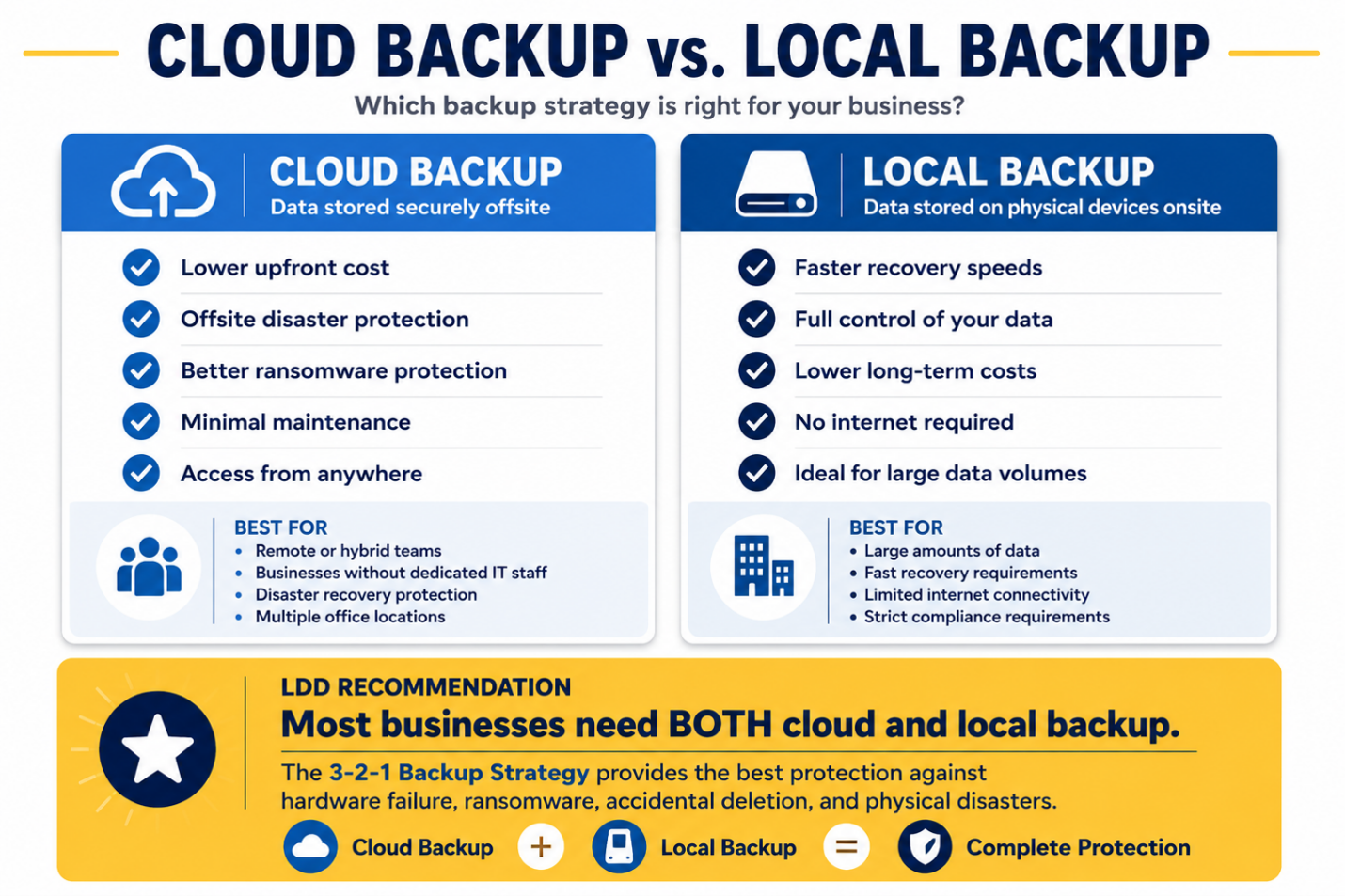
Side-by-Side Comparison
Which Option Fits Your Business
Cloud backup is likely the better fit if:
- You don’t have IT staff to manage and monitor hardware
- Your business operates across multiple locations or remote workers need access to files
- You want offsite protection without maintaining a second physical location
- Your data volume is moderate and recovery time isn’t ultra-critical
Local backup is likely the better fit if:
- You have large volumes of data and need fast recovery
- Your internet connection is unreliable or limited
- You have strict data control or regulatory requirements
- You have IT resources to manage and monitor the hardware
For most small businesses, the answer is both. A combined approach — sometimes called the 3-2-1 backup strategy — means keeping three copies of your data, on two different types of storage, with one stored offsite. Local backup handles speed of recovery; cloud backup handles disaster protection. Together they cover the gaps that either option alone leaves open.
Pro tip: Whatever backup solution you use, test it regularly. A backup that hasn’t been verified is just an assumption. We see businesses discover their backup has been silently failing for months — right after they need it.
Common Mistakes Businesses Make
Mistake 1 — Treating Backup as “Set It and Forget It”
Backup solutions require ongoing monitoring. Hard drives fail. Cloud sync errors go unnoticed. Subscription lapses happen. Without someone verifying that backups are completing successfully and that data can actually be restored, you may have no real backup at all — just the appearance of one.
Mistake 2 — Keeping the Only Backup On-Site
A backup stored in the same building as your primary data isn’t a true disaster recovery solution. Fire, flood, theft, or a power event can take out both at once. If your only backup is a drive sitting next to your server, you’re more exposed than you realize.
Mistake 3 — Not Knowing Your Recovery Time
Most businesses don’t find out how long recovery actually takes until they need it. Testing your restore process in advance — before a crisis — tells you whether your current solution meets your actual business needs. If recovery takes 48 hours and you can’t afford 48 hours of downtime, that’s a problem worth solving now.
Mistake 4 — Assuming Cloud Backup Covers Everything
Cloud backup protects your data, but it doesn’t automatically mean fast recovery of your full environment. Restoring individual files is different from restoring an entire system. Make sure your backup solution matches what you’d actually need to restore in a worst-case scenario.
Frequently Asked Questions
Yes, with the right provider and configuration. Look for providers that offer encryption in transit and at rest, compliance certifications relevant to your industry, and clear data handling policies. For highly regulated industries, verify that the provider meets your specific compliance requirements.
It’s a widely recommended backup strategy: keep three copies of your data, store them on two different types of media, and keep one copy offsite. Combining local and cloud backup is one of the most practical ways to implement this for a small business.
It depends on how much data you can afford to lose. If losing a day’s worth of work is acceptable, daily backups may be sufficient. If even a few hours of lost data would cause serious problems, you need more frequent or continuous backup. Your managed IT services Albuquerque provider can help you define the right recovery point objective for your business.
This is a legitimate concern. Choose established providers with strong track records, read the terms of service carefully, and make sure you always have a local copy of critical data as a fallback. Don’t rely exclusively on a single cloud provider.
Yes. Backup and data protection are part of what we assess for every managed IT client. If you’re not confident in your current setup, contact us and we’ll take a look.
Related Articles & Next Steps
→ How to Build a Disaster Recovery Plan That Actually Works
→ Data Extortion Is the New Threat – Is Your Business Prepared?
Sources
- CISA — Back Up Business Data
- Verizon — 2025 Data Breach Investigations Report

David Luft
CEO, LDD Consulting
David founded LDD Consulting in 2003 with a straightforward mission: help small and mid-sized businesses in Albuquerque and across New Mexico get reliable, enterprise-quality IT support without the enterprise price tag. He holds an MBA with a concentration in Information Systems from the University of New Mexico, along with Microsoft Certified Systems Engineer (MCSE) and Microsoft Certified Trainer (MCT) credentials. He’s been solving business technology problems for more than 25 years.