

Upgrade or Extend?
Making Smart Hardware Decisions in 2026
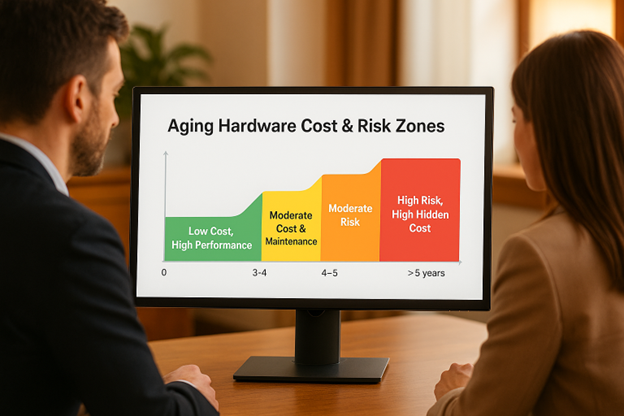
Keeping your business running on reliable hardware is more than a matter of speed — it’s about cost control, security, and day-to-day productivity. But with rising equipment prices and longer manufacturer support cycles, 2026 presents a tricky choice for Albuquerque business owners: should you upgrade your devices or find ways to extend their lifespan?
The answer isn’t always obvious. Many systems upgraded during the pandemic are now approaching five years old, and aging tech can quietly impact security and efficiency long before it fails. This guide breaks down the factors that actually matter when deciding whether to upgrade your hardware or give it a few more years.
Why This Question Matters in 2026
Several trends are shaping hardware decisions for local businesses this year:
- Supply chains have normalized, but prices haven’t returned to pre-pandemic levels — inflation is still affecting replacement costs.
- Many small businesses upgraded gear between 2020 and 2021. Those devices are now reaching the 4–5-year mark, the point when issues start showing up.
- Aging hardware affects more than performance. Older devices create real cybersecurity risks once updates stop, along with downtime, and reduced staff efficiency.
In short: 2026 is a pivotal year for deciding whether to hold onto existing systems or move toward phased upgrades.
Signs It’s Time to Upgrade
Not every device needs to be replaced the moment it gets a little slow. But there are clear indicators that keeping old equipment is doing more harm than good.
5 Signs It’s Time to Upgrade
- Frequent slowdowns, freezing, or random crashes
- The device runs an unsupported operating system—Outdated systems often fall short of modern security and compliance standards, creating avoidable risk.
- Security patches and updates are no longer available
- Repairs and part replacements are becoming frequent — and expensive
- Employees are losing time waiting for the system to respond
If you’re seeing more than one of these, replacing the device may save money in the long run. And when those devices are retired or reassigned make sure they don’t expose sensitive data—a risk we break down in our article on how to stop data leaks when staff leave.
When Extending Hardware Life Makes Sense
Upgrading doesn’t always mean buying something brand new. In many cases, extending your hardware’s life can be a smart, cost-friendly move — especially for small businesses aiming to stretch their IT budget.
Situations where extending makes sense:
- Systems under five years old often benefit from simple upgrades like additional RAM or switching to a solid-state drive (SSD).
- Well-managed cloud services can offload resource-heavy tasks and extend the life of older machines.
- Well-maintained devices — with proactive monitoring, regular updates, and proper cooling — typically last beyond their original lifespan.
- Sustainability matters. Extending hardware life reduces electronic waste and cuts down on unnecessary spending.
A small investment in upgrades or maintenance can buy you one or two more reliable years.
Smarter Planning: Avoid the “All-at-Once” Upgrade Trap
Few things hit a budget harder than replacing every workstation in the same year. A smarter long-term strategy keeps costs predictable and reduces downtime for your team.
Here’s how to avoid the all-at-once upgrade cycle:
- Maintain an asset inventory that tracks device age, warranty status, and user role (front desk vs. specialized workloads).
- Plan a rotating 3–5-year upgrade cycle so replacements happen in smaller, manageable waves.
- Work with an IT provider who can evaluate performance data and identify which machines need attention next.
- Managed IT services help forecast and budget upgrades, preventing surprises and ensuring your environment stays secure and efficient.
A proactive plan turns IT spending from a reactive emergency into a predictable expense.
How to Decide with Confidence
Before you commit to replacing your entire office setup, a quick IT audit can reveal which systems still have plenty of life — and which ones are slowing down your team. Additionally, a cloud cost audit can highlight apps or services that no longer justify their licenses.
Want to make sure your next upgrade decision is the right one? Talk to LDD Consulting about a quick hardware assessment or a managed IT plan tailored to your business’s needs.